

Ashen
84%


 Add To Cart
 Add To Cart
Gorogoa;
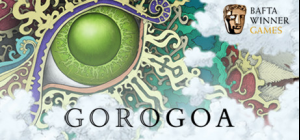
Winner of Debut Game at the 2018 BAFTA Games Awards, as well as Best Mobile Game and the Innovation Award at the GDC 2018 Choice Awards, Gorogoa is an elegant evolution of the puzzle genre, told through a beautifully hand-drawn story designed and illustrated by Jason Roberts.
UNIQUELY IMAGINATIVE PUZZLES
The gameplay of Gorogoa is wholly original, comprised of lavishly illustrated panels that players arrange and combine in imaginative ways to solve puzzles. Impeccably simple, yet satisfyingly complex.
GORGEOUSLY HAND-DRAWN GAMEPLAY
Jason Roberts created thousands of meticulously detailed hand-drawn illustrations, encompassing the impressive scope of Gorogoa's personal narrative.
A NEW KIND OF STORYTELLING
Gorogoa isn't just a game - it's a work of art, expressing itself through soulful, charming illustrations and distinguished puzzle mechanics.
Buy Gorogoa PC game code quickly and safely at the best prices guaranteed via the official retailer etail.market
1)
Download & install the Steam client on your
computer from here.
2)
Open the Steam client, register and login. Then,
locate the Games tab on the top menu. Click that and select “Activate a Product
on Steam..”

3)
Enter your code that is showed on the orders page
of eTail. Market and and follow the steps showed to activate your game.

4)
The game can be monitored now and you can see it
on the "Library" section on Steam. You can download and install the
game now.
5)
If you need more information and support, you
can click here: https://help.steampowered.com/en/wizard/HelpWithSteam
 84%
Add To Cart
84%
Add To Cart
 81%
Add To Cart
81%
Add To Cart
 61%
Out of Stock
61%
Out of Stock
 61%
Add To Cart
61%
Add To Cart
 81%
Add To Cart
81%
Add To Cart
 80%
Add To Cart
80%
Add To Cart
 80%
Add To Cart
80%
Add To Cart
 85%
Add To Cart
85%
Add To Cart
 72%
Add To Cart
72%
Add To Cart
 81%
Add To Cart
81%
Add To Cart
 92%
Add To Cart
92%
Add To Cart
 56%
Add To Cart
56%
Add To Cart