

No Man's Sky
70%


 Add To Cart

 Add To Cart

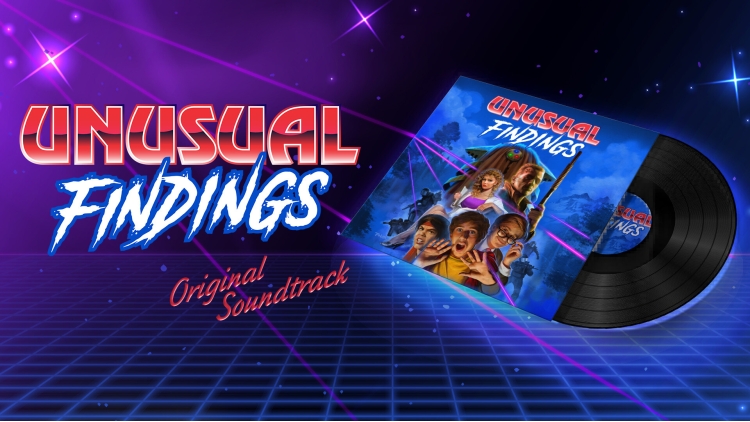
All the tracks from Unusual Findings are written by Tomas Ferrero - vocalist and bass player of Argentinian band Rayos Laser, that has been nominated at MTV Europe Awards and Latin Grammy Awards. All songs are available with covers, credits and full meta tags.
TRACK LIST
01 A Humble Place
02 But The Town Seems So Calm
03 Carpenter Love
04 Charging Energy
05 Dawn is Coming
06 Lights in the sky
07 Looming Danger
08 Relentless Visitor
09 Serpiente River
10 Something Is Off
11 Striding Nights
12 THE BULL
13 The Miracle Was Over
14 Underground Secret
15 Unexpected Creatures
16 Unusual Thing to Find
CREDITS
Music composed by Tomas Ferrero.
Unusual Findings ©2021 Epic Llama. Developed by Epic Llama. Published by ESDigital Games Ltd. All rights reserved. Unusual Findings, Epic Llama an their respective logos are trademarks or registered trademarks of Epic Llama. All other trademarks, logos and copyrights are property of their respective owners. Distributed by ESDigital Games Ltd. All rights reserved.
Buy Unusual Findings - Original Soundtrack PC game code quickly and safely at the best prices guaranteed via the official retailer etail.market
Unusual Findings ©2021 Epic Llama. Developed by Epic Llama. Published by ESDigital Games Ltd. All rights reserved. Unusual Findings, Epic Llama an their respective logos are trademarks or registered trademarks of Epic Llama. All other trademarks, logos and copyrights are property of their respective owners. Distributed by ESDigital Games Ltd. All rights reserved.
1)
Download & install the Steam client on your
computer from here.
2)
Open the Steam client, register and login. Then,
locate the Games tab on the top menu. Click that and select “Activate a Product
on Steam..”

3)
Enter your code that is showed on the orders page
of eTail. Market and and follow the steps showed to activate your game.

4)
The game can be monitored now and you can see it
on the "Library" section on Steam. You can download and install the
game now.
5)
If you need more information and support, you
can click here: https://help.steampowered.com/en/wizard/HelpWithSteam
 70%
Add To Cart
70%
Add To Cart
 15%
Add To Cart
15%
Add To Cart
 27%
Add To Cart
27%
Add To Cart
 90%
Add To Cart
90%
Add To Cart
 15%
Out of Stock
15%
Out of Stock
 56%
Add To Cart
56%
Add To Cart
 31%
Add To Cart
31%
Add To Cart
 92%
Add To Cart
92%
Add To Cart
 92%
Add To Cart
92%
Add To Cart
 0%
Add To Cart
0%
Add To Cart